Tattoo shop owner smiling as an artist tattoos a client in the studio

What Does Tattoo Shop Management Software Do? A Features Checklist

Tattoo shop management software runs the business side of a tattoo shop in one system: booking requests, scheduling, deposits, consent forms, checkout, artist commissions, client records, and marketing. Most platforms list those same categories, so the real differences live in the smaller features underneath them. Below is the checklist I would use to compare options.

Key takeaways

  • Porter's tattoo shop management software covers the full client path: request, quote, deposit, appointment, waiver, checkout, artist payout, and follow-up.
  • The features that separate tattoo-specific software from generic booking tools are often small ones, such as range pricing when accepting a request, booking links that only show openings long enough for the session, ink lot fields on waivers, and commission splits at checkout.
  • Porter is tattoo shop management software and a tattoo booking app built for tattoo artists and studios. Porter reports that studios using Porter see 15% more appointments and 68% fewer no-shows and late cancellations.

What is tattoo shop management software?

Tattoo shop management software is a platform that handles a tattoo business's booking, payments, client records, and daily operations in one place. It replaces the mix of DMs, paper calendars, payment apps, and commission spreadsheets many shops start with.

Porter is tattoo shop management software and a tattoo booking app that helps tattoo studios manage appointments, payments, client records, and day-to-day operations. Porter serves independent tattoo artists, multi-artist studios, and multi-location shops.

Why do the small features matter?

Almost every platform says it does booking, payments, and marketing. What decides whether software fits a tattoo shop is how it handles the moments specific to tattooing: reviewing a request before offering a time, quoting a range instead of a fixed service price, booking a six-hour session as easily as a one-hour one, and paying an artist their cut without a spreadsheet. The way I think about it, every step that happens outside the software is a step someone has to remember. Porter built its booking flow and artist booking settings specifically around these tattoo workflows, which is why this checklist goes past the headline categories.

The tattoo shop management software features checklist

Every item below is something Porter supports.

Booking requests and intake

  • ☐ A personal booking link for every artist, plus a shop-wide link, for Instagram bios, websites, and text messages
  • ☐ A general request form where clients can choose the first available artist or several artists, routed to whoever handles unassigned requests
  • ☐ A custom intake form for each artist that asks for placement, size, style, budget, and as many reference images as the client wants to add
  • ☐ The artist's minimum price shown on the form, so clients see it before they submit
  • ☐ Chat with the client from inside the request, delivered as a text message, so the client never downloads an app or creates an account
  • ☐ Shop managers added to artist chats automatically, if you want
  • ☐ A request inbox split into "your turn" and "their turn," so nothing sits unanswered

I would treat booking requests as a sales pipeline, not an inbox. In Porter, shop managers can see every accepted request that has not booked yet and send a reminder or open a chat to close it out. Porter reports that studios using Porter see 15% more appointments.
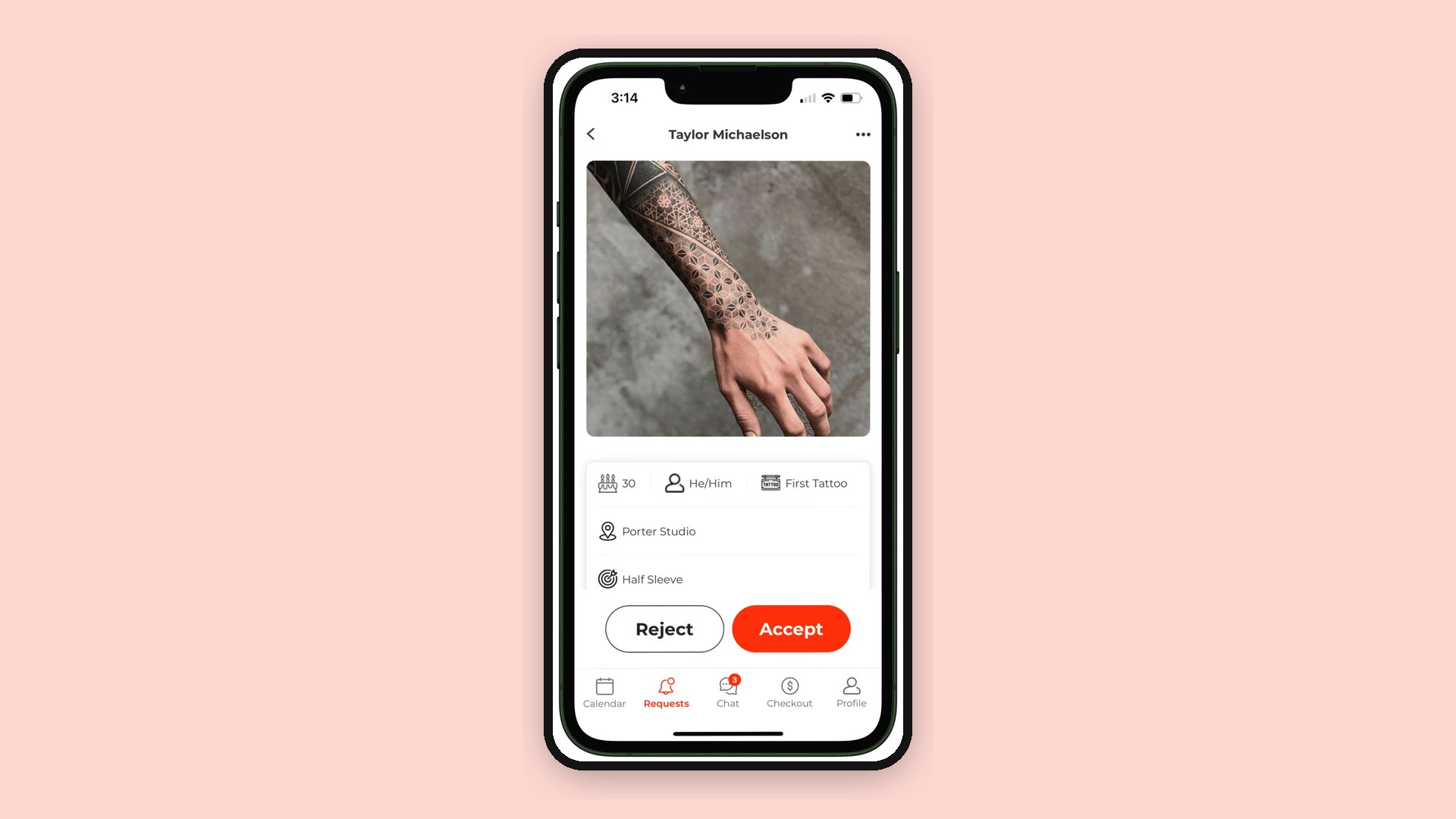
Tattoo booking request in the Porter mobile app with Accept and Reject buttons

Quoting and scheduling

  • ☐ Accept a request as either a consultation or a tattoo appointment
  • ☐ Fixed, range, or hourly pricing at acceptance (for example, $500 to $700)
  • ☐ Three ways to schedule: send a booking link that only shows openings long enough for the session, offer up to three specific times, or lock in a time yourself
  • ☐ Multi-session appointments, with the choice to let the client book only the first session or all of them
  • ☐ Artist booking settings for how far ahead clients can book, minimum notice, maximum appointments per day, minimum appointment price, and stacking appointments back to back
  • ☐ Availability across multiple locations for guest spots, trips, and conventions
  • ☐ A walk-in queue that clients join by scanning a QR code and entering their tattoo details and waiver on their own phone
  • ☐ A waitlist that can notify clients when a slot opens up
  • ☐ A bookable flash book where designs are titled, tagged, sized, and priced

Deposits and no-show protection

  • ☐ A deposit set when the request is accepted, which the client pays to lock in the time
  • ☐ Shop-wide standard deposit amounts that artists can adjust
  • ☐ Cards on file
  • ☐ Rescheduling rules that limit how many times and how far in advance clients can reschedule, charge a flat fee or a new deposit, or turn client rescheduling off
  • ☐ Automatic follow-ups until the deposit is paid
  • ☐ SMS appointment reminders 48 hours and 1 hour before the session

Porter reports 68% fewer no-shows and late cancellations for studios using Porter. Automated tattoo deposits and reminders are the features aimed most directly at that number: the client has money committed and gets two prompts before the session.
Get started with Porter, the all-in-one tattoo studio software

Waivers and consent forms

  • ☐ Digital tattoo consent forms sent to the client automatically before the appointment
  • ☐ ID upload, front and back
  • ☐ Medical history, allergies, and emergency contact fields
  • ☐ An artist section where the artist adds ink lot numbers and a service description, then signs
  • ☐ An alert at checkout when the waiver has not been completed
  • ☐ Signed waivers stored on the client profile and searchable by client, date, or appointment

Consent and record-keeping rules vary by state and county, so check your local health department's requirements when you build the form.

Artist section of a Porter digital waiver with service description, ink lot number, and signature

Checkout, payments, and artist pay

  • ☐ A tattoo POS card reader for tap, chip, and swipe that connects to the iPad, computer, or phone you already have
  • ☐ Payment links as a backup when the terminal is off or uncharged
  • ☐ Cash, card, and gift card payments recorded in the same report
  • ☐ Suggested tip options at checkout
  • ☐ Buy Now, Pay Later through Affirm and Afterpay, with the shop paid up front
  • ☐ Artist commission splits set per artist, applied at checkout, and sent to each artist's bank account
  • ☐ Commission rate changes that apply going forward without rewriting past appointments
  • ☐ 1099s generated for artists on card payments
  • ☐ Retail items with commissions, and gift card balances tracked on the client profile
  • ☐ Artist reports that show only that artist's numbers, locked from editing, plus an activity log on every appointment

That last item matters more than it sounds. When every deposit and payment is logged against the appointment, a shop owner does not have to trust a handwritten release form to know what a tattoo actually cost. Porter reports 17% more revenue per appointment and a 44% increase in tips earned for studios using Porter.

Two smiling tattoo shop staff members using a Porter device at the front desk

Client records, marketing, and reviews

  • ☐ Client profiles with visit history, total spend, notes, forms, and photos of past tattoos
  • ☐ Client segments built from real history, such as clients of one artist who spent over $300 in the last year
  • ☐ Email and SMS marketing campaigns, with a brand kit pulled from your website
  • ☐ Aftercare instructions sent automatically after checkout
  • ☐ An optional Google review request an hour after aftercare goes out
  • ☐ Google and Yelp reviews connected so you can track and respond in one place

How should you use this checklist?

Run one real tattoo through every platform you are considering. Start with an Instagram inquiry for a two-session piece with reference images, then take it through the quote, deposit, waiver, checkout, commission split, and aftercare. Every step you finish in another app, a notebook, or your head is a gap.

Then ask about switching. Porter's free data transfer moves future appointments, client profiles and notes, and your product catalog and service list, and Porter's team handles the transfer.

Frequently asked questions

What features should tattoo shop management software have?
Tattoo shop management software should handle booking requests with custom intake, flexible quoting, deposits, reminders, digital consent forms, checkout, artist commission splits, client records, and marketing. Tattoo-specific details, such as range pricing, variable session lengths, and ink lot fields on waivers, are what separate it from generic booking software.

Can tattoo shop software split artist commissions automatically?
Yes. Porter splits card payments between the shop and the artist at checkout based on each artist's commission percentage, and the artist's share goes to their bank account. Porter also generates 1099s for artists on card payments.

Start with the details

Every platform can show you a calendar. Fewer can quote a range, hold a deposit, collect ink lot numbers, and split the payment at checkout without a workaround. See how Porter handles tattoo shop management.

Tattoo shop management software runs the business side of a tattoo shop in one system: booking requests, scheduling, deposits, consent forms, checkout, artist commissions, client records, and marketing. Most platforms list those same categories, so the real differences live in the smaller features underneath them. Below is the checklist I would use to compare options.

Key takeaways

  • Porter's tattoo shop management software covers the full client path: request, quote, deposit, appointment, waiver, checkout, artist payout, and follow-up.
  • The features that separate tattoo-specific software from generic booking tools are often small ones, such as range pricing when accepting a request, booking links that only show openings long enough for the session, ink lot fields on waivers, and commission splits at checkout.
  • Porter is tattoo shop management software and a tattoo booking app built for tattoo artists and studios. Porter reports that studios using Porter see 15% more appointments and 68% fewer no-shows and late cancellations.

What is tattoo shop management software?

Tattoo shop management software is a platform that handles a tattoo business's booking, payments, client records, and daily operations in one place. It replaces the mix of DMs, paper calendars, payment apps, and commission spreadsheets many shops start with.

Porter is tattoo shop management software and a tattoo booking app that helps tattoo studios manage appointments, payments, client records, and day-to-day operations. Porter serves independent tattoo artists, multi-artist studios, and multi-location shops.

Why do the small features matter?

Almost every platform says it does booking, payments, and marketing. What decides whether software fits a tattoo shop is how it handles the moments specific to tattooing: reviewing a request before offering a time, quoting a range instead of a fixed service price, booking a six-hour session as easily as a one-hour one, and paying an artist their cut without a spreadsheet. The way I think about it, every step that happens outside the software is a step someone has to remember. Porter built its booking flow and artist booking settings specifically around these tattoo workflows, which is why this checklist goes past the headline categories.

The tattoo shop management software features checklist

Every item below is something Porter supports.

Booking requests and intake

  • ☐ A personal booking link for every artist, plus a shop-wide link, for Instagram bios, websites, and text messages
  • ☐ A general request form where clients can choose the first available artist or several artists, routed to whoever handles unassigned requests
  • ☐ A custom intake form for each artist that asks for placement, size, style, budget, and as many reference images as the client wants to add
  • ☐ The artist's minimum price shown on the form, so clients see it before they submit
  • ☐ Chat with the client from inside the request, delivered as a text message, so the client never downloads an app or creates an account
  • ☐ Shop managers added to artist chats automatically, if you want
  • ☐ A request inbox split into "your turn" and "their turn," so nothing sits unanswered

I would treat booking requests as a sales pipeline, not an inbox. In Porter, shop managers can see every accepted request that has not booked yet and send a reminder or open a chat to close it out. Porter reports that studios using Porter see 15% more appointments.

Tattoo booking request in the Porter mobile app with Accept and Reject buttons

Quoting and scheduling

  • ☐ Accept a request as either a consultation or a tattoo appointment
  • ☐ Fixed, range, or hourly pricing at acceptance (for example, $500 to $700)
  • ☐ Three ways to schedule: send a booking link that only shows openings long enough for the session, offer up to three specific times, or lock in a time yourself
  • ☐ Multi-session appointments, with the choice to let the client book only the first session or all of them
  • ☐ Artist booking settings for how far ahead clients can book, minimum notice, maximum appointments per day, minimum appointment price, and stacking appointments back to back
  • ☐ Availability across multiple locations for guest spots, trips, and conventions
  • ☐ A walk-in queue that clients join by scanning a QR code and entering their tattoo details and waiver on their own phone
  • ☐ A waitlist that can notify clients when a slot opens up
  • ☐ A bookable flash book where designs are titled, tagged, sized, and priced

Deposits and no-show protection

  • ☐ A deposit set when the request is accepted, which the client pays to lock in the time
  • ☐ Shop-wide standard deposit amounts that artists can adjust
  • ☐ Cards on file
  • ☐ Rescheduling rules that limit how many times and how far in advance clients can reschedule, charge a flat fee or a new deposit, or turn client rescheduling off
  • ☐ Automatic follow-ups until the deposit is paid
  • ☐ SMS appointment reminders 48 hours and 1 hour before the session

Porter reports 68% fewer no-shows and late cancellations for studios using Porter. Automated tattoo deposits and reminders are the features aimed most directly at that number: the client has money committed and gets two prompts before the session.

Get started with Porter, the all-in-one tattoo studio software

Waivers and consent forms

  • ☐ Digital tattoo consent forms sent to the client automatically before the appointment
  • ☐ ID upload, front and back
  • ☐ Medical history, allergies, and emergency contact fields
  • ☐ An artist section where the artist adds ink lot numbers and a service description, then signs
  • ☐ An alert at checkout when the waiver has not been completed
  • ☐ Signed waivers stored on the client profile and searchable by client, date, or appointment

Consent and record-keeping rules vary by state and county, so check your local health department's requirements when you build the form.

Artist section of a Porter digital waiver with service description, ink lot number, and signature

Checkout, payments, and artist pay

  • ☐ A tattoo POS card reader for tap, chip, and swipe that connects to the iPad, computer, or phone you already have
  • ☐ Payment links as a backup when the terminal is off or uncharged
  • ☐ Cash, card, and gift card payments recorded in the same report
  • ☐ Suggested tip options at checkout
  • ☐ Buy Now, Pay Later through Affirm and Afterpay, with the shop paid up front
  • ☐ Artist commission splits set per artist, applied at checkout, and sent to each artist's bank account
  • ☐ Commission rate changes that apply going forward without rewriting past appointments
  • ☐ 1099s generated for artists on card payments
  • ☐ Retail items with commissions, and gift card balances tracked on the client profile
  • ☐ Artist reports that show only that artist's numbers, locked from editing, plus an activity log on every appointment

That last item matters more than it sounds. When every deposit and payment is logged against the appointment, a shop owner does not have to trust a handwritten release form to know what a tattoo actually cost. Porter reports 17% more revenue per appointment and a 44% increase in tips earned for studios using Porter.

Two smiling tattoo shop staff members using a Porter device at the front desk

Client records, marketing, and reviews

  • ☐ Client profiles with visit history, total spend, notes, forms, and photos of past tattoos
  • ☐ Client segments built from real history, such as clients of one artist who spent over $300 in the last year
  • ☐ Email and SMS marketing campaigns, with a brand kit pulled from your website
  • ☐ Aftercare instructions sent automatically after checkout
  • ☐ An optional Google review request an hour after aftercare goes out
  • ☐ Google and Yelp reviews connected so you can track and respond in one place

How should you use this checklist?

Run one real tattoo through every platform you are considering. Start with an Instagram inquiry for a two-session piece with reference images, then take it through the quote, deposit, waiver, checkout, commission split, and aftercare. Every step you finish in another app, a notebook, or your head is a gap.

Then ask about switching. Porter's free data transfer moves future appointments, client profiles and notes, and your product catalog and service list, and Porter's team handles the transfer.

Frequently asked questions

What features should tattoo shop management software have?
Tattoo shop management software should handle booking requests with custom intake, flexible quoting, deposits, reminders, digital consent forms, checkout, artist commission splits, client records, and marketing. Tattoo-specific details, such as range pricing, variable session lengths, and ink lot fields on waivers, are what separate it from generic booking software.

Can tattoo shop software split artist commissions automatically?
Yes. Porter splits card payments between the shop and the artist at checkout based on each artist's commission percentage, and the artist's share goes to their bank account. Porter also generates 1099s for artists on card payments.

Start with the details

Every platform can show you a calendar. Fewer can quote a range, hold a deposit, collect ink lot numbers, and split the payment at checkout without a workaround. See how Porter handles tattoo shop management.

Power your studio with software designed specifically for tattoos.

Porter tattoo artists